As an Amazon Associate, we earn from qualifying purchases. Some links on this site are affiliate links at no extra cost to you. Our recommendations are based on thorough research and editorial judgment.


How Do I Set Up Navigation and Routes on My Bike Computer?

To set up navigation and routes on our bike computer, we start by creating or downloading routes in compatible formats like GPX. Next, we transfer these files via USB, Bluetooth, or Wi-Fi. Once uploaded, we access the navigation menu. We can link additional sensors for enhanced data accuracy. Using high-resolution screens, we can view our routes clearly. Should we encounter issues, checking GPS signal and sensor alignment can help. There’s more to optimizing our setup.
Key Takeaways
- Create or download routes in GPX format from cycling platforms like Garmin Connect or Strava, ensuring accuracy in distance and elevation.
- Import routes to your bike computer via USB transfer, mobile app synchronization, or cloud uploads for easy access during rides.
- Customize your bike computer’s navigation settings to utilize turn-by-turn directions and adjust screen layouts for better visibility.
- Ensure optimal GPS signal by positioning your bike computer level and in an unobstructed view of the sky while riding.
- Regularly check and troubleshoot connections, sensor alignment, and GPS signal strength to maintain reliable navigation during your rides.
Understanding Different Types of Bike Computers
You may be interested


When we talk about bike computers, it helps to understand the different types available on the market.
Basic Bike Computers
These units track essential metrics like speed, distance, and time without GPS. They often feature simple displays and button-operated interfaces.
Advanced GPS Units
These computers offer full mapping capabilities, touchscreen displays, and integration with third-party services.
Training-Focused Computers
These models provide in-depth performance metrics, compatibility with power meters, and heart rate monitors.
Smart Bike Computers
These devices mimic smartphone features with apps, crash detection, and payment options.
Display and Battery Considerations
Display interface variations impact usability. Battery life varies, with simpler units lasting longer, while advanced models drain quicker due to connectivity features and larger screens. Additionally, many advanced units offer long battery life which is essential for extended rides.
Recommended Products

Advanced, watch-style dive computer features a stunning 1.4” AMOLED display, scratch-resistant sapphire lens, 51 mm titanium bezel and optional titanium bracelet

[Garmin Fenix 7X Pro – Sapphire Solar Edition] a 51 mm high-performance smartwatch w/ Carbon Gray DLC Titanium bezel & Black Silicone Band, designed for everyday use without any compromises.
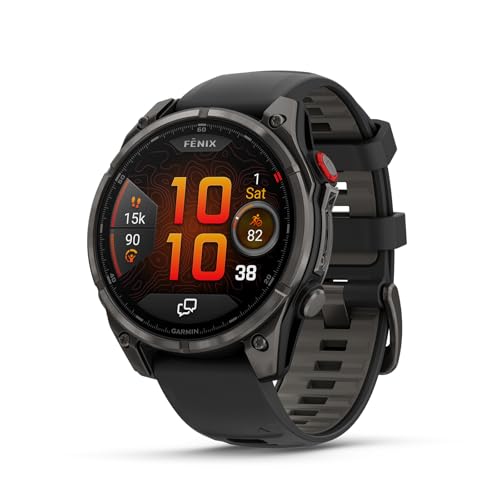
Multisport GPS smartwatch with built-in inReach technology for two-way satellite and LTE connectivity (active subscription required; coverage limitations may apply; some jurisdictions regulate or prohibit the use of satellite communication devices)
Preparing Routes for Upload

Preparing routes for upload is a vital step in optimizing our cycling experience. It begins with effective route preparation using GPX files, the most common format for bike routes. We can create or download routes from platforms like Garmin Connect, Strava, or Ride with GPS. Before finalizing, we should always double-check the route data—distance, elevation, and surface types—to guarantee they match our intended ride. Advanced navigation features significantly improve the overall cycling experience, making it essential to understand how our bike computer utilizes multi-satellite GPS support. Editing routes is equally important. Many route planners allow us to modify existing routes by changing start and finish points, adding waypoints, or avoiding busy roads. We can preview maps and elevation profiles to determine if the route aligns with our skills. Naming routes clearly in our apps helps us stay organized and avoid confusion.
Transfer Methods for Route Files

Transferring route files to our bike computers is essential for ensuring we have our navigational data ready for rides. There are several transfer methods available:
- USB Transfer Methods: We can connect our bike computers directly to a PC or Mac via USB. By locating the “Routes” folder, we can copy GPX files directly.
- Mobile App Synchronization: Using apps like Garmin Connect, we can upload routes wirelessly via Bluetooth or WiFi, allowing for easy access.
- Cloud Uploads: Importing files to our bike computer’s cloud platform offers route management and backup capabilities.
- Wireless Transfers: Some computers support direct Bluetooth or Wi-Fi file transfers, simplifying the process.
- Memory Card Imports: For offline transfers, we can use microSD or USB cards for compatible devices. Each method offers unique advantages tailored to our needs. Additionally, certain models, like the Garmin Edge 540, provide enhanced navigation features that improve route planning.
Recommended Products

【PREMIUM STUDIO-STYLE CYCLING EXPERIENCE】The Sunny Polaris is designed for serious indoor riders seeking immersive studio-style cardio workouts, advanced performance training, and premium connected fitness at home.
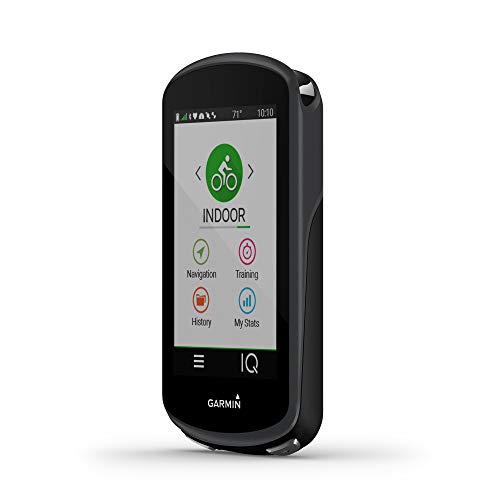
The ultimate GPS cycling computer with 3.5” color touchscreen display combines navigation, performance, cycling awareness and smart connectivity.Special Feature:Dynamic Performance Insights; TrainingPeaks Structured Workouts.

ON-DEVICE TURN BY TURN NAVIGATION - The ELEMNT BOLT will automatically generate turn-by-turn prompts for routes and file types; including GPX files, TCX files, and routes imported from Strava, Ride With GPS, and Komoot. Top LEDs and audible cues let you know, at-a-glance, what your next turn is or if you've gotten off-course.
Navigating Using Your Bike Computer

Steering using our bike computer can considerably enhance our riding experience, offering visibility and accuracy on the go. With features like turn-by-turn directions, we get clear prompts for upcoming turns. High-resolution screens improve map readability, while zooming capabilities let us preview routes and adjust as needed.
Automatic rerouting minimizes confusion if we stray off course. Multi-band GNSS technology guarantees accuracy even in challenging areas, enhancing our navigation reliability. Also, some devices integrate trail conditions and route preferences, offering real-time data useful for off-road adventures. Additionally, many modern cycling computers utilize advanced sensor technology for more effective navigation and performance tracking.
Ultimately, our bike computer simplifies navigation, allowing us to focus on our ride while making sure we stay on track with the right information at our fingertips.
Accessing the Navigation Menu

Accessing the navigation menu on our bike computer is straightforward. We typically find this feature on the home screen or main menu. By pressing the menu or home button, we access navigation options, which include map browsing, location searching, course creation, and route selection. Depending on our device, physical buttons or touchscreen controls facilitate smooth steering.
To optimize our experience, we can customize the main menu to prioritize navigation features. This customization makes accessing routes and maps more efficient. Additionally, we can view previous rides, suggested workouts, and recently created courses directly from the navigation menu. Incorporating these navigation menu features enhances our overall biking experience, allowing us to focus more on our ride and less on steering our device. Furthermore, utilizing high-lumen output bike lights during rides can significantly improve visibility and safety in low-light conditions.
Mounting Your Bike Computer
Mounting our bike computer securely is vital for an efficient riding experience. First, we must choose a mount type that guarantees mount compatibility with our specific bike computer model. Popular options include stem mounts, out front mounts, and stem front mounts, each designed for different handlebars and riding styles.
Next, we prepare the mounting location. It’s important to position the mount for clear visibility while avoiding interference with brake and shift cables. We can use rubber inserts for various stem or handlebar sizes.
Securing the mount involves using the supplied hardware, taking care not to overtighten. Finally, we slide the bike computer into the mount, ensuring it locks in place. Proper mount placement enhances our riding experience and maintains stability. Additionally, ensuring that your bike is equipped with properly inflated tires will further improve your overall riding performance.
Recommended Products

Elevate your cycling experience with the ultimate cockpit, combining the sleek design of the Stealth+ Premium Stem Mount with the versatile functionality of the Computer Mount Adaptor.

COMPATIBLE WITH ALL WAHOO CYCLING COMPUTERS: designed for full compatibility with all Wahoo models, this mount ensures a secure and stable connection, making it ideal for cyclists who rely on Wahoo devices for performance tracking and navigation during rides.

Bracket for fitting cycle computer to Deda Elementi Vinci Stems
Positioning for Optimal Navigation
When we set up our bike computer for ideal navigation, positioning plays a critical role. For optimal mount positioning, we should place the device at or slightly above handlebar height, angled towards our line of sight. This minimizes glare and guarantees readability in varying light conditions.
Furthermore, mounting near the stem provides balance between visibility and easy access. It’s essential to make visibility adjustments that keep the screen clearly visible while riding in both seated and standing positions.
We must also guarantee that the computer doesn’t obstruct other controls or impede our hands. Finally, maintaining a secure mount helps prevent screen movement on tough terrain, assuring a reliable navigation aid during our rides. Additionally, considering the weight and packability of your bike computer can enhance overall riding efficiency, especially during long-distance trips where lightweight designs are crucial for comfort.
Customizing Display Settings
How can we enhance our riding experience through display customization? By adjusting our bike computer’s screen layout, we can prioritize relevant metrics, which ultimately aids our performance. First, we can select specific data fields like speed, heart rate, or distance by tapping on them to access customization menus.
Next, we can create multiple screens tailored for various contexts—such as climbing or training—ensuring we always have the right information at hand.
Additionally, modifying screen layouts allows us to determine how many data fields we see at once. Combining performance and navigation data enhances our situational awareness. Finally, adjusting visual elements, like brightness and color schemes, improves readability in different lighting conditions, ensuring ideal use during rides. Moreover, utilizing high lumen outputs can significantly boost visibility when navigating in low-light environments, enhancing overall safety during rides.
Linking Additional Sensors
Linking additional sensors to a bike computer can greatly enhance our riding experience by providing essential performance data. Utilizing wireless connectivity, we can easily pair various sensors like heart rate monitors, cadence sensors, and power meters.
Recommended Products

🚲【Built-in 4G GPS: Tracks Even When the Battery Is Removed】: Built-in 4G GPS IOT with real-time tracking, vibration alerts, and app notifications — a feature typically found only on $3,000+ smart bikes!Critically, the GPS continues running even if the main battery is disconnected. A physical lock is a deterrent. A tracked bike is a recovery option.
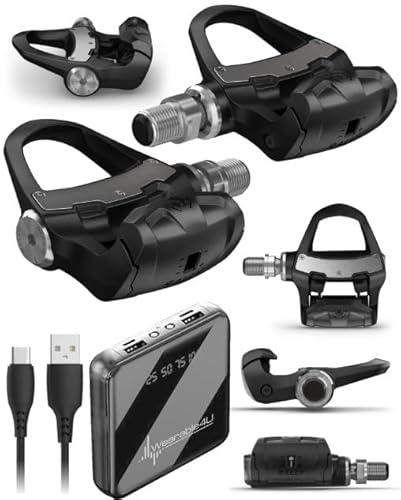
IMPECCABLY DESIGNED PEDAL. Rally power meters have undergone rigorous testing to ensure total reliability. Featuring a superior design with sensors housed inside, this sleek pedal installs like any pedal. And it's quick to transfer between bikes.

Product 1: See and record what’s behind you with a built-in camera that saves footage automatically if it detects an incident
Sensor Pairing Process
To begin, we must place the bike computer within 3 meters of the sensor. For successful pairing, we activate the sensors—like wearing a heart rate monitor or spinning cranks for a power meter.
Maintaining Connection
Once paired, our bike computer automatically reconnects when the sensor is active and within range. It’s important to keep at least 10 meters away from other riders’ sensors to prevent interference. We can customize our bike computer’s display to show data from these linked sensors, enhancing our performance tracking. Additionally, ensuring high-quality materials in your bike components can contribute to improved sensor performance and durability.
Enhanced Accuracy With GPS
Enhancing our bike rides with GPS technology not only improves our navigation but also sharpens the precision of our performance metrics. To achieve enhanced accuracy, we must guarantee a clear view of the sky for ideal GPS signal acquisition. Positioning our bike computer level and facing forward on the handlebars minimizes interference. Avoid placing devices behind thick objects or under dense tree cover, as these degrade signal quality.
For improved data accuracy, we can utilize calibration techniques. This includes calibrating wheel circumference and altitude settings to complement GPS data. Regularly checking GPS signal strength on our bike computer interface can help us troubleshoot any tracking issues. With these practices, we can maximize the benefits of GPS for precise performance metrics. Additionally, integrating an insulated bike bottle can keep our hydration at optimal temperatures, enhancing overall performance during rides.
Saving and Managing Routes
When we set up our bike computers, saving and managing routes effectively can greatly enhance our riding experience. Route organization is essential for easy navigation. We can import routes from popular cycling apps like Strava and Komoot, which guarantees seamless integration.
Most bike computers support offline accessibility, allowing us to save routes directly on the device. We can create multiple profiles for different ride types and easily reorder or delete routes as needed. Features such as “Back on Track” help us return to saved paths if we deviate. Additionally, many devices automatically store recent rides for quick access. Always verify compatibility with the necessary file formats (.gpx, .fit) for ideal route management on our devices.
Troubleshooting Common Navigation Issues
Troubleshooting navigation issues is an essential part of optimizing our experience with bike computers.
Sensor Alignment: Confirm the wheel magnet is close to the sensor (within millimeters) for accurate readings. A “click” sound during tests confirms proper alignment.
Battery Replacement: Check both the sensor and bike computer for battery life. If we notice intermittent signals or no data display, it’s time for a battery replacement.
Wireless Connectivity: The sensor’s distance from the bike computer directly affects signal strength. If data isn’t displaying, consider resetting the connection or performing a device reset to resolve potential communication errors.
Frequently Asked Questions
Can I Use My Bike Computer Without a Smartphone?
Yes, we can use our bike computer without a smartphone. With the right bike computer setup, we can enjoy offline navigation, accessing preloaded routes and essential metrics, making our rides independent and hassle-free.
How Do I Update My Bike Computer’s Maps?
Updating our bike computer’s maps is like tuning a musical instrument; we’ll connect it to our computer, download map updates, and follow navigation tips provided by the manufacturer. Let’s keep our rides on the right track!
What Is the Battery Life of GPS Bike Computers?
The battery life of GPS bike computers varies widely, typically ranging from 12 to 120 hours. By utilizing battery conservation methods and effective power management, we can greatly enhance ride duration for our adventures.
Are There Bike Computers Specifically for Mountain Biking?
Yes, there are bike computers designed specifically for mountain biking. They boast mountain bike features like rugged designs and improved navigation accuracy, ensuring we stay on track even in tough trail conditions.
How Do I Reset My Bike Computer to Factory Settings?
Ever get frustrated with a stubborn bike computer? To perform a factory reset, we access the settings menu and confirm the reset process—erasing our customizations but potentially bringing back a seamless ride experience.


